在用find查看系统中一些大文件时,发现一些/var/log下面的文件其真实磁盘占用空间的大小与find中设置的size选项筛选的不一致。如下:
$sudo find /var/log -type f -size +200M | xargs -i{} ls -sh {}
#其他一些输出
47M /var/log/rpmdbdata.mdb-20201214
47M /var/log/rpmdbdata.mdb
47M /var/log/rpmdbdata.mdb-20201129
47M /var/log/rpmdbdata.mdb-20201206
47M /var/log/rpmdbdata.mdb-20201220
200K /var/log/lastlog

$ls -l /var/log/lastlog
-rw-r--r-- 1 root root 393861864 Dec 27 23:39 /var/log/lastlog

$ls -l /var/log/rpmdbdata.mdb
-rw-r--r-- 1 root root 268435456 Dec 27 03:37 /var/log/rpmdbdata.mdb

$sudo du -s /var/log/lastlog  /var/log/rpmdbdata.mdb
200 /var/log/lastlog     # 单位是KB
47596 /var/log/rpmdbdata.mdb
尽管是用find筛选出文件大小大于200MB的,但其中的/var/log/rpmdbdata.mdb 占用的磁盘空间只有47MB,/var/log/lastlog 则更少 只占用200KB的磁盘空间。
原来 find 中的size筛选针对的是文件大小,而 ls 的 -s 选项是显示实际占用的磁盘空间大小,du 命令也是查看文件占用的磁盘空间。(当然平时的ls -l 不用 -s 选项时 显示的文件大小 而非磁盘空间占用量)
当发现du看到的占用磁盘大小比ls看到的文件大小 小一些时,说明该文件是稀疏文件。
现代很多文件系统都支持稀疏文件(sparse file),稀疏文件内存在空洞(hole)就是一些值为0的空间,在存储时这部分只存储一些元数据表示空洞而不是真正存有为0的值,这样起到节省磁盘空间的作用。在虚拟化中的磁盘镜像,经常用到稀疏文件(qcow2/raw等格式都支持sparse file)。稀疏文件示意图 如下图所示:
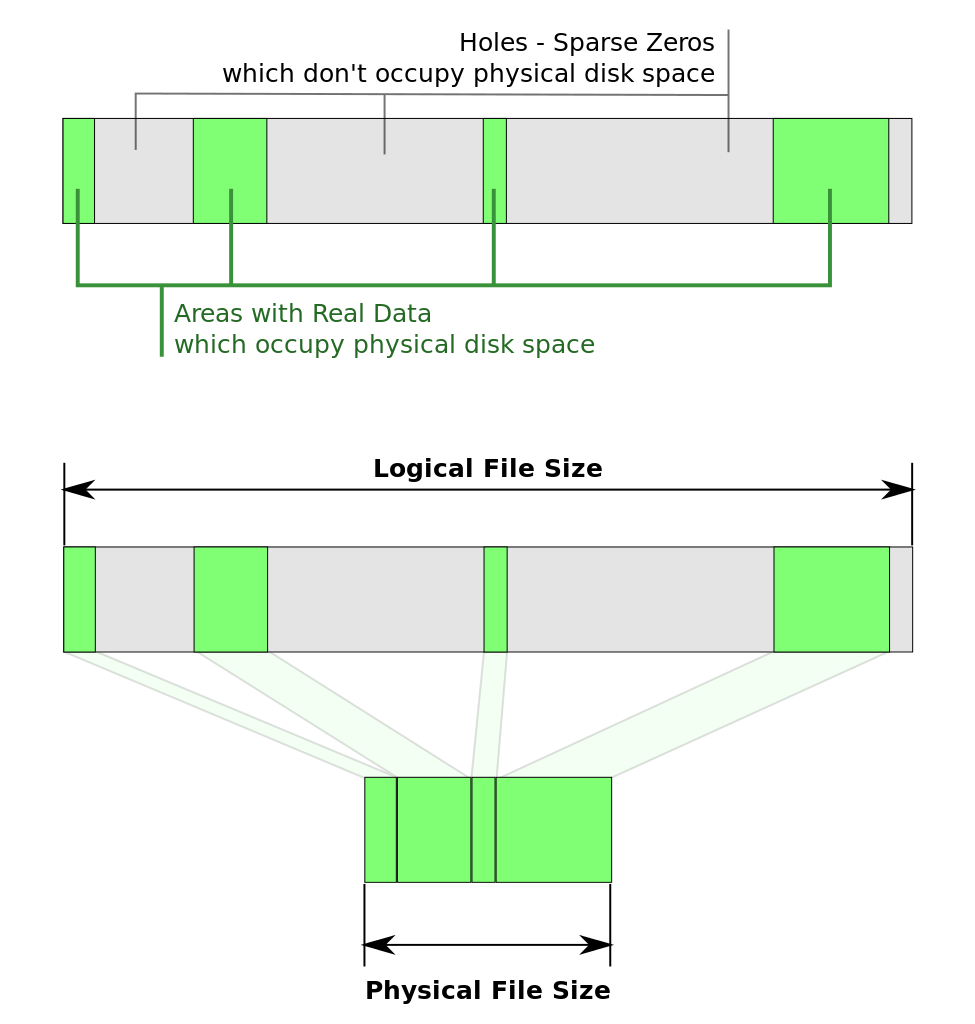
同时在find命令中使用 -printf "%S" 也是可以直接打印出稀疏文件的稀疏值的,稀疏文件的稀疏值是小于1的。演示如下:
$sudo find /var/log -type f -printf "%S\t%p\n" | awk '$1 < 1.0 {print}'
0.180618  /var/log/rpmdbdata.mdb-20201214
0.181564  /var/log/rpmdbdata.mdb
0.180618  /var/log/rpmdbdata.mdb-20201129
0.180618  /var/log/rpmdbdata.mdb-20201206
0.181091  /var/log/rpmdbdata.mdb-20201220
0.000519979 /var/log/lastlog
可以看到 /var/log/rpmdbdata.mdb 的稀疏值为0.181564,/var/log/lastlog 的稀疏值则更小。满足这个公式:文件大小 * 稀疏值 = 实际的磁盘占用空间大小
查询的man手册中关键信息:
man ls
       -h, --human-readable
              with -l, print sizes in human readable format (e.g., 1K 234M 2G)
       -s, --size
              print the allocated size of each file, in blocks
       -S     sort by file size  (largest first 文件大的在前面)


man find
     -size n[cwbkMG]
              File uses n units of space.  The following suffixes can be used:
              `b'    for 512-byte blocks (this is the default if no suffix is used)
              `c'    for bytes
              `w'    for two-byte words
              `k'    for Kilobytes (units of 1024 bytes)
              `M'    for Megabytes (units of 1048576 bytes)
              `G'    for Gigabytes (units of 1073741824 bytes)
             The  size  does not count indirect blocks, but it does count blocks in sparse files that are not actually allocated.

     -printf format  : print  format  on  the  standard  output
              %k     The  amount of disk space used for this file in 1K blocks. Since disk space is allocated in multiples of the filesystem block size this is usually greater than %s/1024, but it can also be smaller if the file is a sparse file.
              %p     File's name.
              %s     File's size in bytes.
              %S     File's sparseness.  This is calculated as (BLOCKSIZE*st_blocks / st_size).  The exact value you will get for an ordinary file of a certain  length is system-dependent.  However, normally sparse files will have values less than 1.0, and files which use indirect blocks may have a value which is greater than 1.0.   The value used for BLOCKSIZE is system-dependent, but is usually 512 bytes.   If the file size is zero, the value  printed  is undefined.  On systems which lack support for st_blocks, a file's sparseness is assumed to be 1.0.
参考资料:
https://wiki.archlinux.org/index.php/sparse_file
https://www.systutorials.com/handling-sparse-files-on-linux/
https://www.lisenet.com/2014/so-what-is-the-size-of-that-file/
man ls, man find